


IIS Attribute Dialog

This dialog allows you to configure IIS properties.
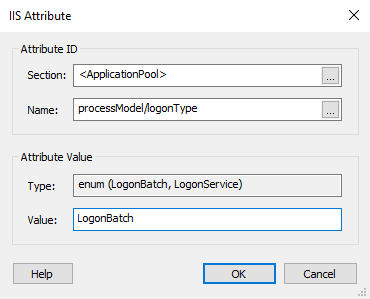
Attribute ID
Section
The attribute you want to set must be a member of this IIS configuration section.
<WebSite>, <VirtualDirectory> and <ApplicationPool> are section pseudonames used for grouping direct attributes of the website/virtual directory/application pool.
Name
Specify a name for the attribute.
Attribute Value
Type
Provides type information for the selected attribute.
 An Enum attribute consists of just one of the displayed
options. A Flags attribute may contain any number of the
displayed options, separated by a comma.
An Enum attribute consists of just one of the displayed
options. A Flags attribute may contain any number of the
displayed options, separated by a comma.
Value
This field is of Formatted Type and
can be edited using Smart Edit Control.