


- Introduction
- Registration
- Using Advanced Installer
- Features and Functionality
- Tutorials
- Samples
- How-tos
- Application/Package
- Files and Folders
- Services and Processes
- Custom Actions How Tos
- Create fully fledged C# custom actions
- Debug a .VBS custom action
- Debug a .Net Installer Custom Action
- Get installer properties in .Net Installer Class Custom Actions
- Create a patch that runs a custom action
- Launch a CMD or BAT file
- Add configurable parameters for a Merge Module
- Control the installation process using Custom Actions
- Integrate and debug custom actions
- Set an installer property using custom actions
- Access installer properties from deferred custom actions
- Handle .NET assembly custom action built to target any CPU architecture of .Net Runtime
- How to run a custom action before and after a prerequisite installation
- Access Session object in PowerShell custom actions
- Use the Session object from PowerShell custom actions
- Secure Property
- Create a log
- Organization
- Load installer property from configuration file
- Pass configuration file for prerequisite
- Implement software identification
- Restart the machine after the installation
- Make the package install per-user or per-machine
- RegistrySearch
- Add HKCU registry entries or per-user files for all users
- Create MSI wrapper over EXE installers
- MSI Package Silent Install - How do I create one?
- Installing multiple instances from the command line
- Single-click run my application from its installation package
- Configure server-side serial number validation
- Validate serial number during Wizard Dialogs Stage only
- Collect installation data and send it to a web server
- Implement self-healing into the application
- Installing Driver
- Installing drivers in mixed packages
- Sideload MSIX using an MSI
- Deploying a Python script
- Deploy certificates required by Office 2010
- Installing Screen Saver
- Windows Restart Manager
- Create a chained installation
- Create an Access Database installer
- Create a web-based installation package.
- Install Add-in Express based Office add-ins
- Launch application at logon/startup
- How 32-bit setup packages behave on 64-bit machines
- Conditionally install a prerequisite based on the user selection
- Create updates with a repackaged application
- Set the Publisher ID for a UWP AppX
- Distribute Windows Updates among the installer
- Configure help setup package among the installer
- Localize a project segment
- How to have a property with different default value for each build
- Launch a certain application from an APPX package after install.
- Create AppInstaller file for MSIX packages.
- Instal and configure COMs.
- Azure Active Directory - registering Advanced Installer for Device Guard Signing.
- EV Code Signing in Advanced Installer
- Detect applications that keep files in use at install time.
- Add merge modules to your project.
- Build Microsoft Store distribution and sideloading distribution MSIX packages with a single build operation
- Import an MSIX built with Visual Studio
- Configuring Azure Artifact Signing or Digicert Keylocker
- Run powershell script to populate a CheckList
- Convert COM registration from MSI to MSIX.
- Installer for Large Resources Overcoming MSI Size Limits.
- Using Azure Trusted Signing in your GitHub Actions
- How to Brand Installers for Partners and Customers
- Repackaging Large Applications from a Packager's Perspective
- How to Add Custom Prerequisite to Your Project Using WiX Toolset
- How to Add Prerequisites to a Visual Studio Setup Project
- How to compare file versions in conditionst
- 32/64-bit
- User Interface
- Upgrade
- Uninstall/Maintenance
- ODBC/SQL
- IIS
- Java
- Licensing
- Advanced Analytics SDK
- Application/Package
- FAQs
- Windows Installer
- Deployment Technologies
- IT Pro
- MSIX
- Video Tutorials
- Advanced Installer Blog
- Table of Contents
- Introduction
- Registration
- Using Advanced Installer
- Features and Functionality
- Tutorials
- Samples
- How-tos
- Application/Package
- Files and Folders
- Services and Processes
- Custom Actions How Tos
- Create fully fledged C# custom actions
- Debug a .VBS custom action
- Debug a .Net Installer Custom Action
- Get installer properties in .Net Installer Class Custom Actions
- Create a patch that runs a custom action
- Launch a CMD or BAT file
- Add configurable parameters for a Merge Module
- Control the installation process using Custom Actions
- Integrate and debug custom actions
- Set an installer property using custom actions
- Access installer properties from deferred custom actions
- Handle .NET assembly custom action built to target any CPU architecture of .Net Runtime
- How to run a custom action before and after a prerequisite installation
- Access Session object in PowerShell custom actions
- Use the Session object from PowerShell custom actions
- Secure Property
- Create a log
- Organization
- Load installer property from configuration file
- Pass configuration file for prerequisite
- Implement software identification
- Restart the machine after the installation
- Make the package install per-user or per-machine
- RegistrySearch
- Add HKCU registry entries or per-user files for all users
- Create MSI wrapper over EXE installers
- MSI Package Silent Install - How do I create one?
- Installing multiple instances from the command line
- Single-click run my application from its installation package
- Configure server-side serial number validation
- Validate serial number during Wizard Dialogs Stage only
- Collect installation data and send it to a web server
- Implement self-healing into the application
- Installing Driver
- Installing drivers in mixed packages
- Sideload MSIX using an MSI
- Deploying a Python script
- Deploy certificates required by Office 2010
- Installing Screen Saver
- Windows Restart Manager
- Create a chained installation
- Create an Access Database installer
- Create a web-based installation package.
- Install Add-in Express based Office add-ins
- Launch application at logon/startup
- How 32-bit setup packages behave on 64-bit machines
- Conditionally install a prerequisite based on the user selection
- Create updates with a repackaged application
- Set the Publisher ID for a UWP AppX
- Distribute Windows Updates among the installer
- Configure help setup package among the installer
- Localize a project segment
- How to have a property with different default value for each build
- Launch a certain application from an APPX package after install.
- Create AppInstaller file for MSIX packages.
- Instal and configure COMs.
- Azure Active Directory - registering Advanced Installer for Device Guard Signing.
- EV Code Signing in Advanced Installer
- Detect applications that keep files in use at install time.
- Add merge modules to your project.
- Build Microsoft Store distribution and sideloading distribution MSIX packages with a single build operation
- Import an MSIX built with Visual Studio
- Configuring Azure Artifact Signing or Digicert Keylocker
- Run powershell script to populate a CheckList
- Convert COM registration from MSI to MSIX.
- Installer for Large Resources Overcoming MSI Size Limits.
- Using Azure Trusted Signing in your GitHub Actions
- How to Brand Installers for Partners and Customers
- Repackaging Large Applications from a Packager's Perspective
- How to Add Custom Prerequisite to Your Project Using WiX Toolset
- How to Add Prerequisites to a Visual Studio Setup Project
- How to compare file versions in conditionst
- 32/64-bit
- User Interface
- Upgrade
- Uninstall/Maintenance
- ODBC/SQL
- IIS
- Java
- Licensing
- Advanced Analytics SDK
- Application/Package
- FAQs
- Windows Installer
- Deployment Technologies
- IT Pro
- MSIX
- Video Tutorials
- Advanced Installer Blog
- Table of Contents
How to run a custom action before and after a prerequisite installation

Sometimes, standard procedures aren't enough, and you need to incorporate custom actions to ensure everything runs smoothly. If you find yourself in need of executing specific actions before or after the installation of a prerequisite, fear not.
Here's a guide on how to seamlessly integrate your custom actions into your setup process:
1. Add your custom action as a custom action without sequence:
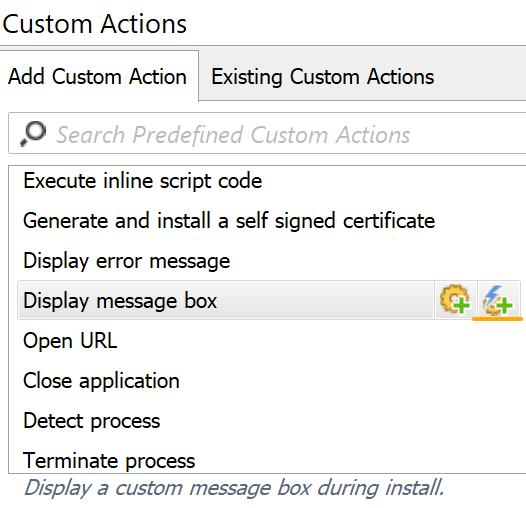
This ensures that your action gets executed on a specific event e.g. before or after prerequisite installation, without being tied down to a specific step in the installation process.
2. Once added, the custom action will be available in the Existing Custom Actions view:
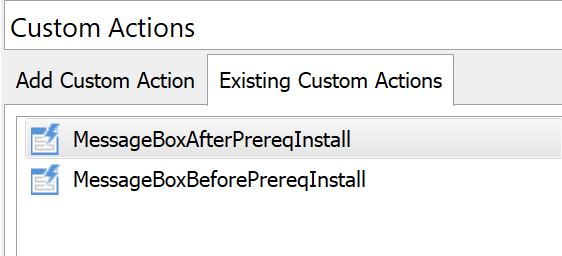
This centralized tab provides a convenient overview of all the custom actions from your setup.
3. In the Prerequisite Setup Files tab, select the custom action that will be executed before or after the prerequisite installation:
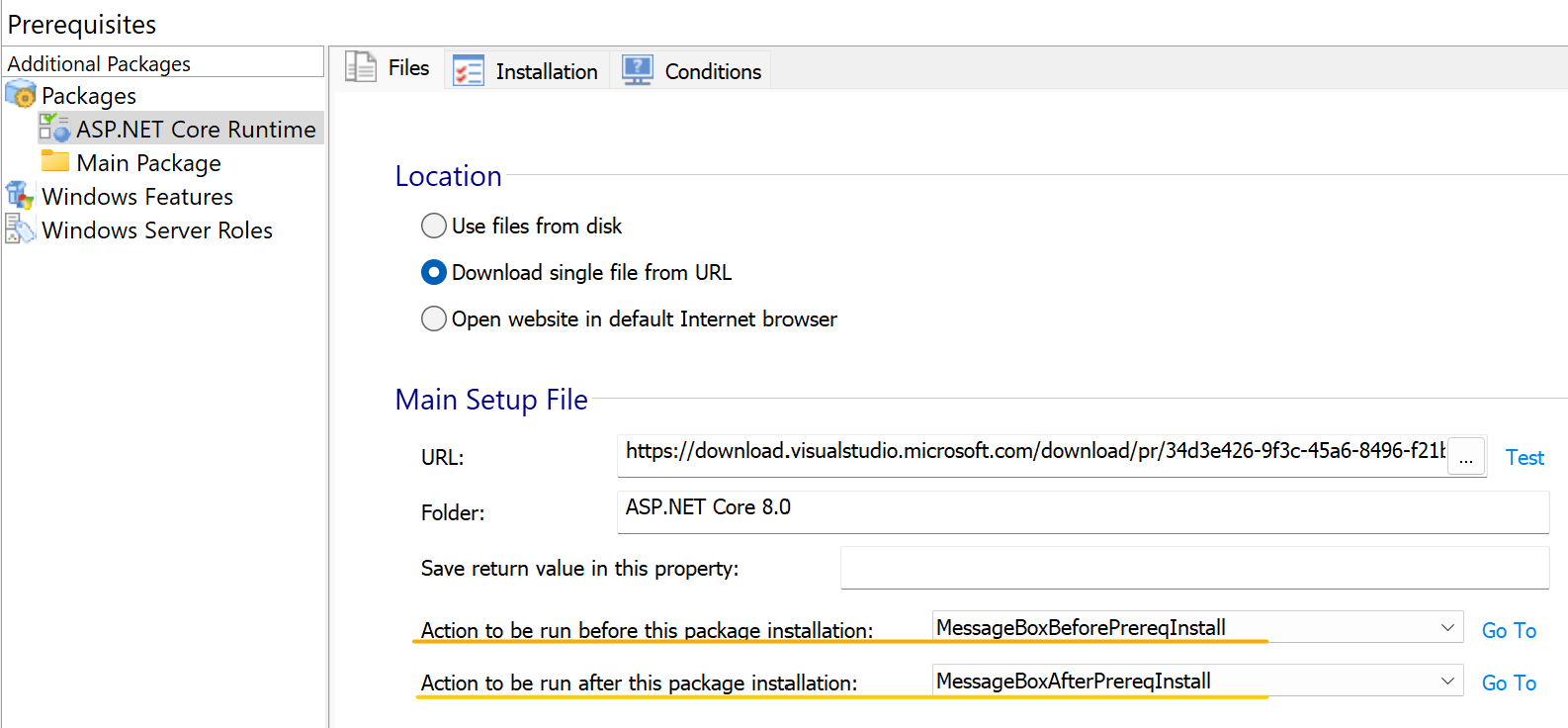
Whether you prefer PowerShell scripts, batch files, or any other method, there are no restrictions. This flexibility empowers you to tailor your actions precisely to your project's needs, ensuring optimal functionality and efficiency.